
If your employees save just 30 minutes of Excel work per person per week, that adds up to over 1,000 hours a year for 50 people.
Most users don't utilise Excel to its full potential because they've never been shown how to do it properly. They sort manually instead of filtering. They type out values instead of importing them via queries. They build analyses by hand instead of using PivotTables. And they don't notice when formulas give wrong results when copied.
This course package is precisely where it all begins. Holger Wöltje will show you in three compact courses how to use Excel in a way that genuinely simplifies your work – and in such a way that you can immediately put what you’ve learned into practice.
Not everyone needs Excel daily. But when a project suddenly demands a clean analysis, the need is immediate – and the video courses are readily available when it counts.
Compact, practical, no filler
The courses follow a consistent principle: showing precisely the functions that make the biggest difference – and in such a way that you can apply what you've learned immediately. No theory marathons detailing every unnecessary button. No functions that you might only use once in ten years. Instead, practical, hands-on training on exactly what your employees need in their day-to-day work, what really saves time, and creates more clarity.
Excel Beginners' Course (approx. 85 minutes)
For those who have rarely worked with Excel before, or wish to refresh their basic knowledge before tackling more demanding topics, this is the right starting point.
You will learn, among other things:
- how an Excel file is structured and how to safely navigate through workbooks, sheets, columns, and rows,
- how to adapt the user interface to your way of working and save yourself unnecessary clicks,
- how to format text and numbers to make tables understandable at a glance (including currencies, negative values in red, and cleanly rounded displays for exact stored values),
- how to automatically fill monthly series and recurring values with AutoFill, instead of typing them in,
- how to use simple formulas, the SUM function and the average – and why a results row in tables is later the key to correct subtotals when filtering,
- how to create a compelling chart and customise it effectively in just a few clicks.
Excel Advanced Course I (approx. 70 minutes)
Building on the introductory course, the first advanced course shows how robust analyses can be created from raw data in a short time.
You will learn, among other things:
- how to focus on what's important with filters and slicers without changing your original data,
- how to precisely use text filters with wildcards and AND/OR operators,
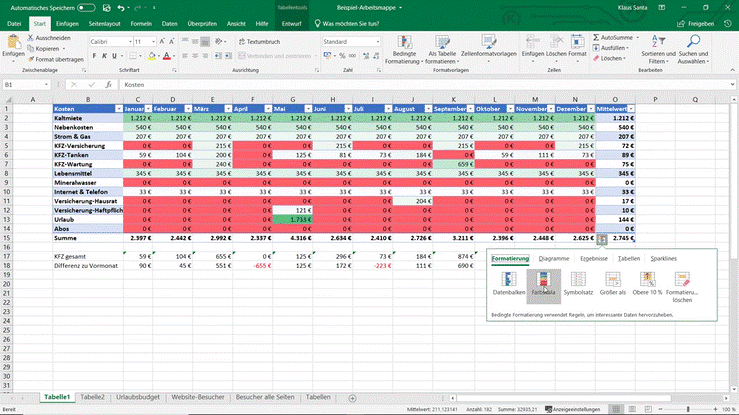
- how to insert bars, colour scales and icons into your data in seconds with Quick Analysis and make connections visible that get lost in pure columns of numbers,
- how to quickly track down errors from accidentally overwritten formulas,
- how to import address lists (e.g. from newsletter systems) cleanly – even with international character sets that other import methods fail with,
- how to import data using Power Query and refresh it later with a single click, instead of redoing the import each time.
Advanced Excel Course II (approx. 105 minutes)
Building on the first two courses, this second advanced course focuses on the functions that save the most time in practice – and where users most often stumble without good guidance.
You will learn, among other things:
- how to import project appointments from your Outlook calendar and calculate monthly working hours from them (including typical pitfalls with appointments that extend beyond midnight and with sums exceeding 24 hours),
- How to prepare an Outlook view so that exporting to Excel works smoothly for any external tools,
- how to correctly use relative and absolute cell references – the difference often decides whether a formula delivers correct results when copied or unknowingly calculates nonsense,
- how to customise conditional formatting in detail, for example to highlight the highest five percent of a value range or to display bars only from a certain threshold,
- how to supplement customer data using a customer number with lookups or look up tiered shipping costs – and what pitfalls the approximate match holds,
- What Pivot Tables are and why it's worth getting acquainted with them at your leisure: You can evaluate data based on different criteria in seconds, move fields by drag-and-drop, and present your results clearly with slicers and timelines.
Start effective further training for your employees
On screen in the office, at home, or on the go. Independently, with support, or as an integral part of your professional development plan. For individual team members, a department, or the entire company.
During delivery, you have a choice: learning directly on Holger Wöltje's platform, or integration into your own LMS, for example, as a SCORM or xAPI package. Individual MP4 video files are also possible.
Request your demo access now and see for yourself.
P.S.: An Excel one-day seminar typically reaches up to ten participants and requires everyone to attend on the same date. With this course package, you can train dozens of colleagues simultaneously – at your own pace and at a fraction of the cost per person.
P.P.S. Your team will no longer curse Excel, but master it. Start now with your demo access.